Jan 2025 - Ongoing
SAP Design System Portal
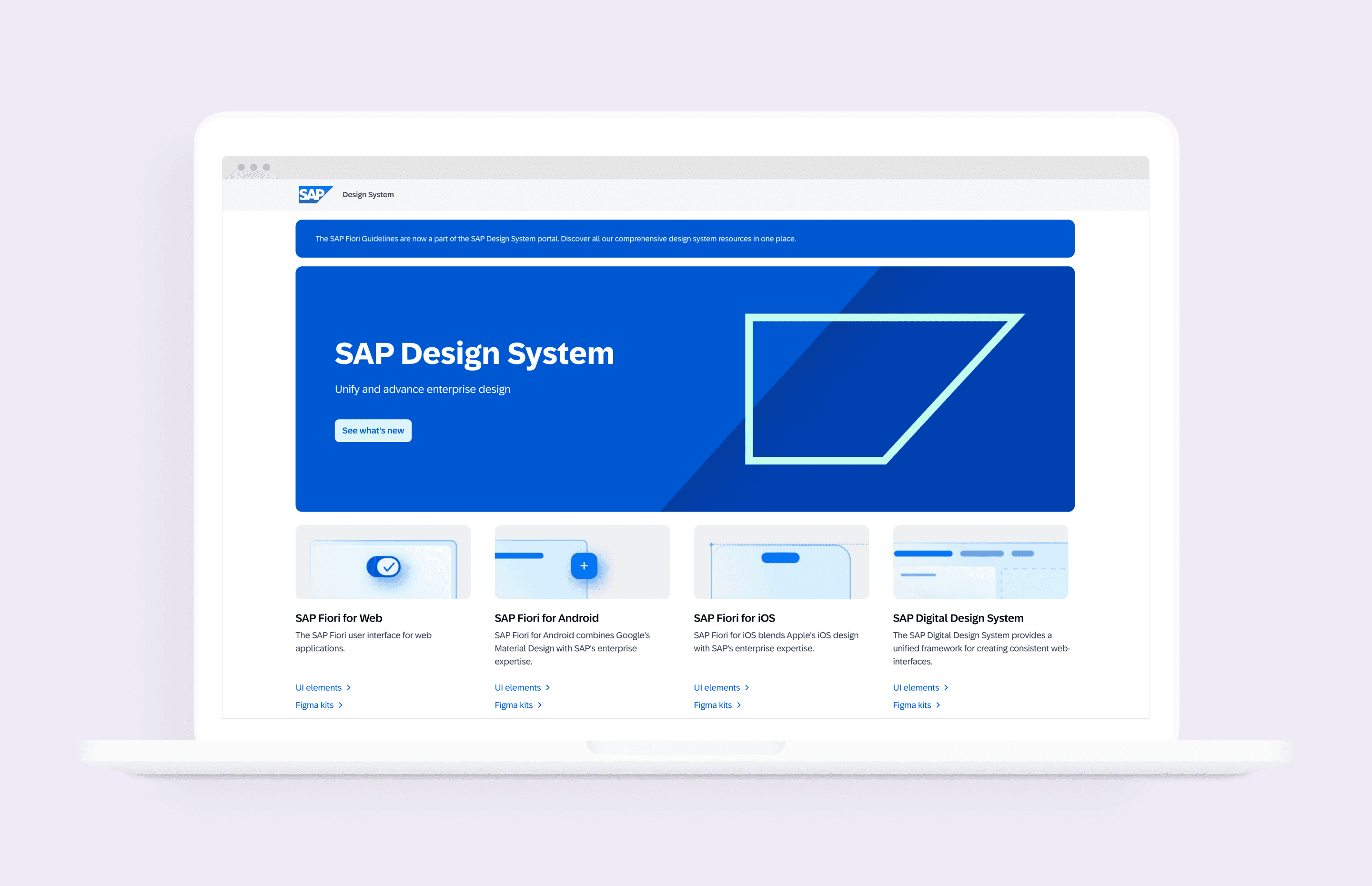
The SAP Design System Portal is the central hub for design guidelines across SAP’s product suite.
As the senior UX designer and researcher on the project, I led various initiatives to evolve the Portal from the MVP and improve its overall usability.
Jan 2025 - Ongoing
SAP Design System Portal
The SAP Design System Portal is the central hub for design guidelines across SAP’s product suite.
As the senior UX designer and researcher on the project, I led various initiatives to evolve the Portal from the MVP and improve its overall usability.
Jan 2025 - Ongoing
SAP Design System Portal
The SAP Design System Portal is the central hub for design guidelines across SAP’s product suite.
As the senior UX designer and researcher on the project, I led various initiatives to evolve the Portal from the MVP and improve its overall usability.
The Need
The Need
The Need
The MVP of the new SAP Design System Portal consolidated all SAP design guidelines into one place. After launch, however, users reported difficulty navigating the site and locating information—challenges that grew as the content expanded to over four times its original volume.
The MVP of the new SAP Design System Portal consolidated all SAP design guidelines into one place. After launch, however, users reported difficulty navigating the site and locating information—challenges that grew as the content expanded to over four times its original volume.
The MVP of the new SAP Design System Portal consolidated all SAP design guidelines into one place. After launch, however, users reported difficulty navigating the site and locating information—challenges that grew as the content expanded to over four times its original volume.
"Wow that [side navigation] is so hidden. You have so much space, why would you hide that?"
- PRODUCT DESIGNER
"Wow that [side navigation] is so hidden. You have so much space, why would you hide that?"
- PRODUCT DESIGNER
"Wow that [side navigation] is so hidden. You have so much space, why would you hide that?"
- PRODUCT DESIGNER
The Solution
The Solution
The Solution
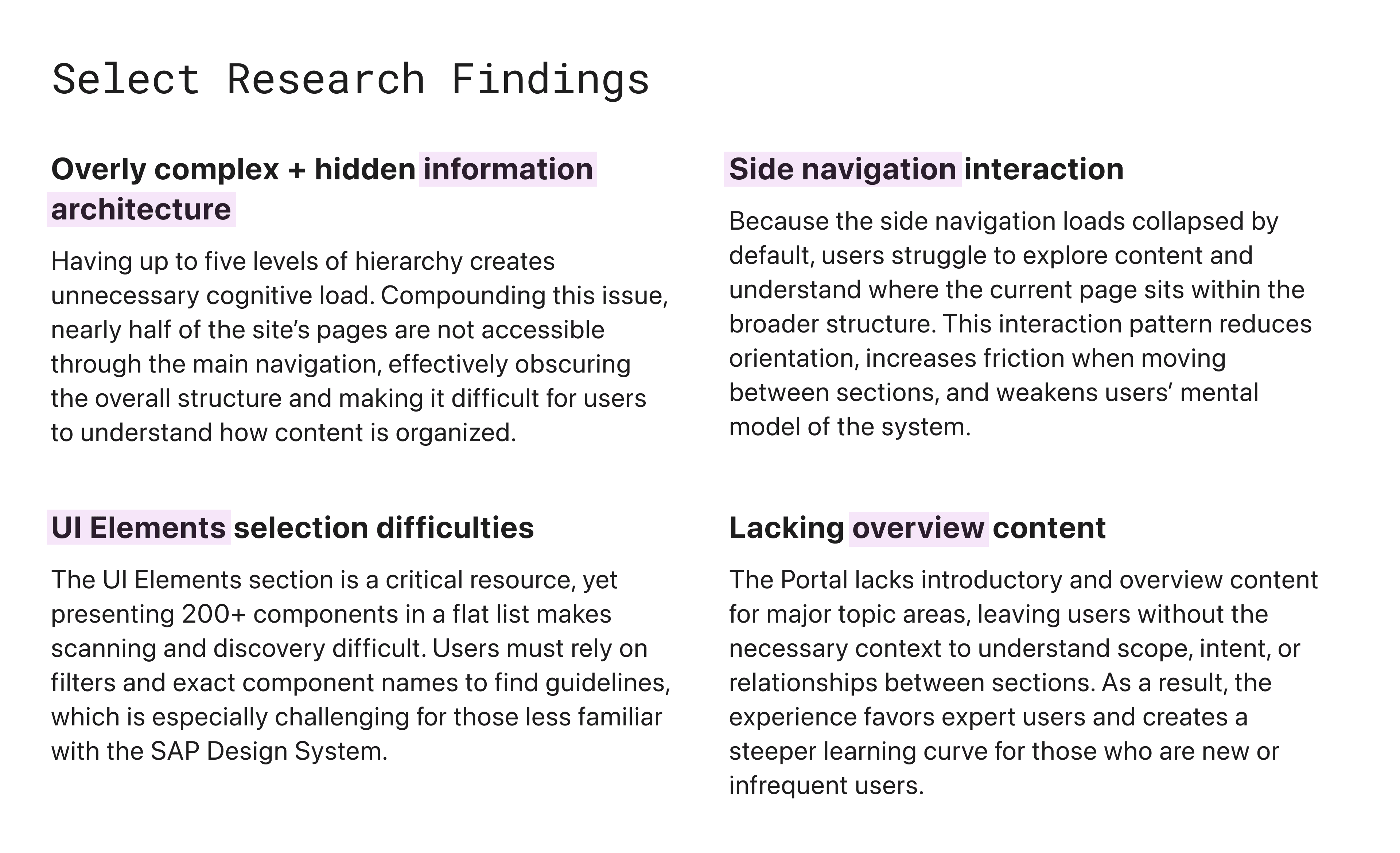
As part of an ongoing UX Improvements initiative, we conducted several user research studies and redesigned key aspects of the site to make it easier to explore and digest. Updates included a refined information architecture and navigation, as well as new overview pages to help users more easily explore and understand the structure of the site.
As part of an ongoing UX Improvements initiative, we conducted several user research studies and redesigned key aspects of the site to make it easier to explore and digest. Updates included a refined information architecture and navigation, as well as new overview pages to help users more easily explore and understand the structure of the site.
As part of an ongoing UX Improvements initiative, we conducted several user research studies and redesigned key aspects of the site to make it easier to explore and digest. Updates included a refined information architecture and navigation, as well as new overview pages to help users more easily explore and understand the structure of the site.
UX Improvements
UX Improvements
UX Improvements
Side Navigation
Side Navigation
Side Navigation
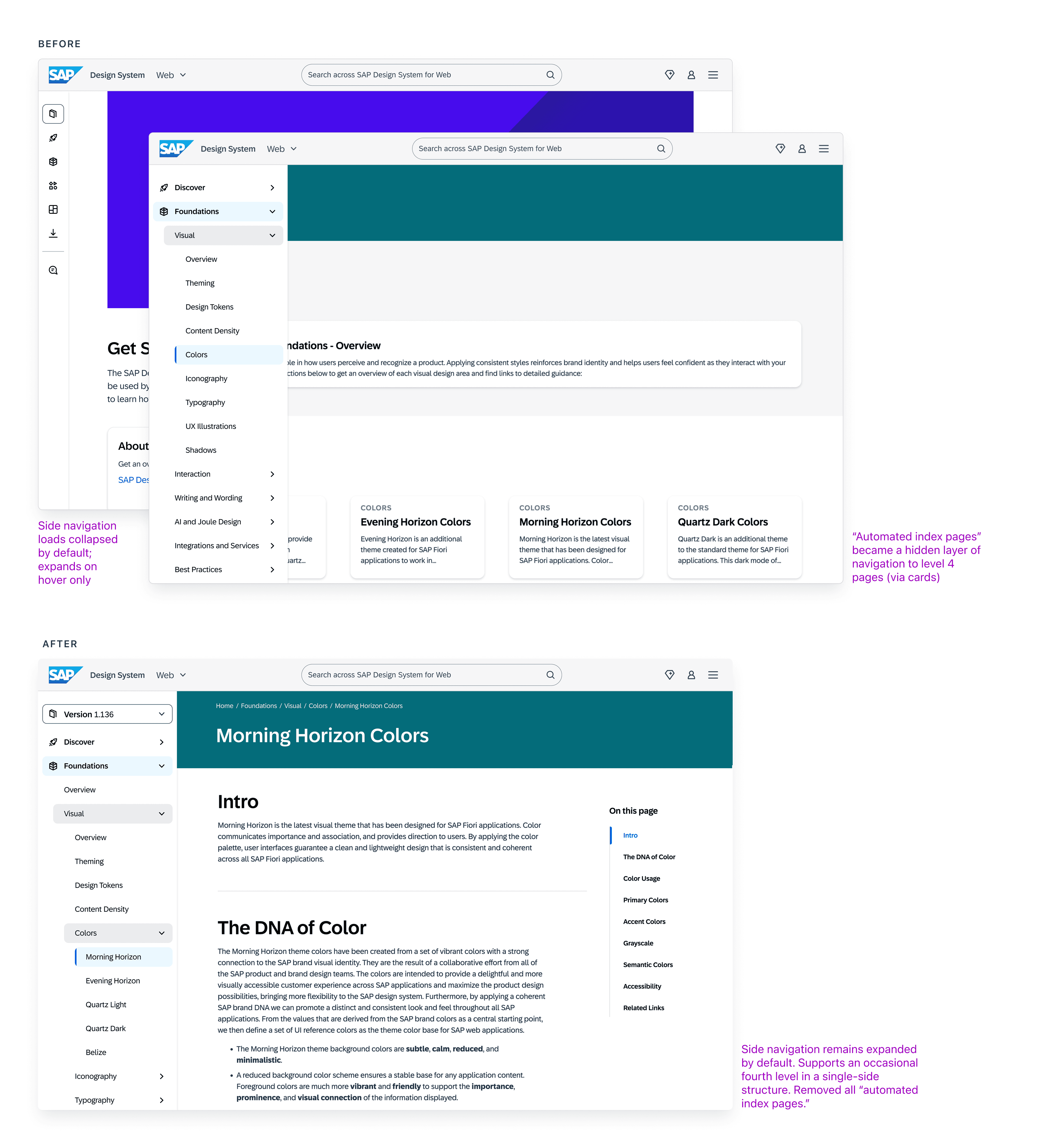
Based on research findings, the navigation remains a single-side structure. It now supports an optional fourth level to accommodate the scale of the SAP Design System, while content teams are encouraged to limit hierarchy to three levels when possible to better support accessibility.
The side navigation also remains expanded by default on all desktop breakpoints, enabling easier navigation across the portal.
Based on research findings, the navigation remains a single-side structure. It now supports an optional fourth level to accommodate the scale of the SAP Design System, while content teams are encouraged to limit hierarchy to three levels when possible to better support accessibility.
The side navigation also remains expanded by default on all desktop breakpoints, enabling easier navigation across the portal.
Based on research findings, the navigation remains a single-side structure. It now supports an optional fourth level to accommodate the scale of the SAP Design System, while content teams are encouraged to limit hierarchy to three levels when possible to better support accessibility.
The side navigation also remains expanded by default on all desktop breakpoints, enabling easier navigation across the portal.
UI Elements Section
UI Elements Section
UI Elements Section
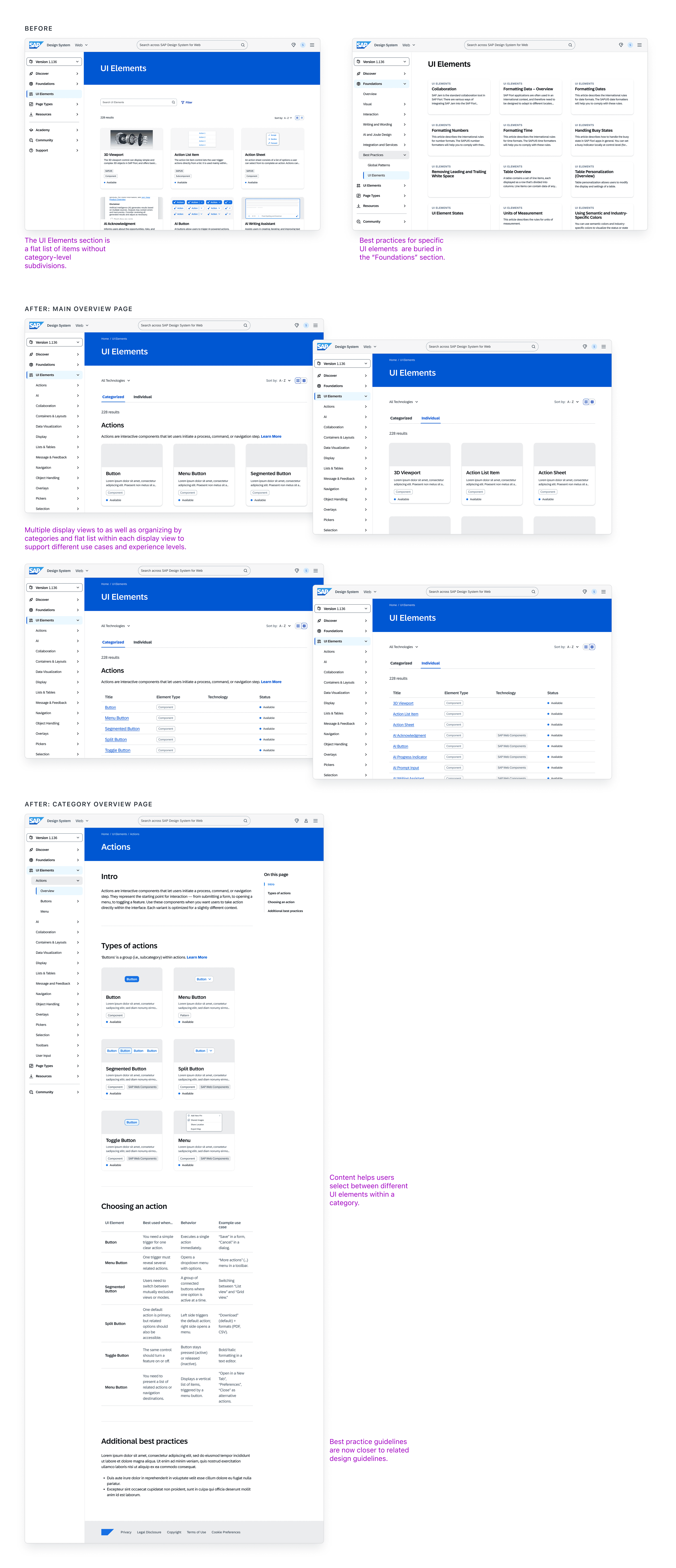
I redesigned the main overview page with flexibility in mind, organizing UI elements by use-case–based categories as well as a flat list. Multiple display views support quick scanning and visual reference. This improved wayfinding extends into the side navigation through added subsections.
All UI elements are now organized into categories based on primary use cases. I designed new category overview pages that help guide selection between UI elements and relocated best practices content so they live alongside related design guidelines, creating a more connected and efficient workflow for users.
I redesigned the main overview page with flexibility in mind, organizing UI elements by use-case–based categories as well as a flat list. Multiple display views support quick scanning and visual reference. This improved wayfinding extends into the side navigation through added subsections.
All UI elements are now organized into categories based on primary use cases. I designed new category overview pages that help guide selection between UI elements and relocated best practices content so they live alongside related design guidelines, creating a more connected and efficient workflow for users.
I redesigned the main overview page with flexibility in mind, organizing UI elements by use-case–based categories as well as a flat list. Multiple display views support quick scanning and visual reference. This improved wayfinding extends into the side navigation through added subsections.
All UI elements are now organized into categories based on primary use cases. I designed new category overview pages that help guide selection between UI elements and relocated best practices content so they live alongside related design guidelines, creating a more connected and efficient workflow for users.
Information Architecture
Information Architecture
Information Architecture
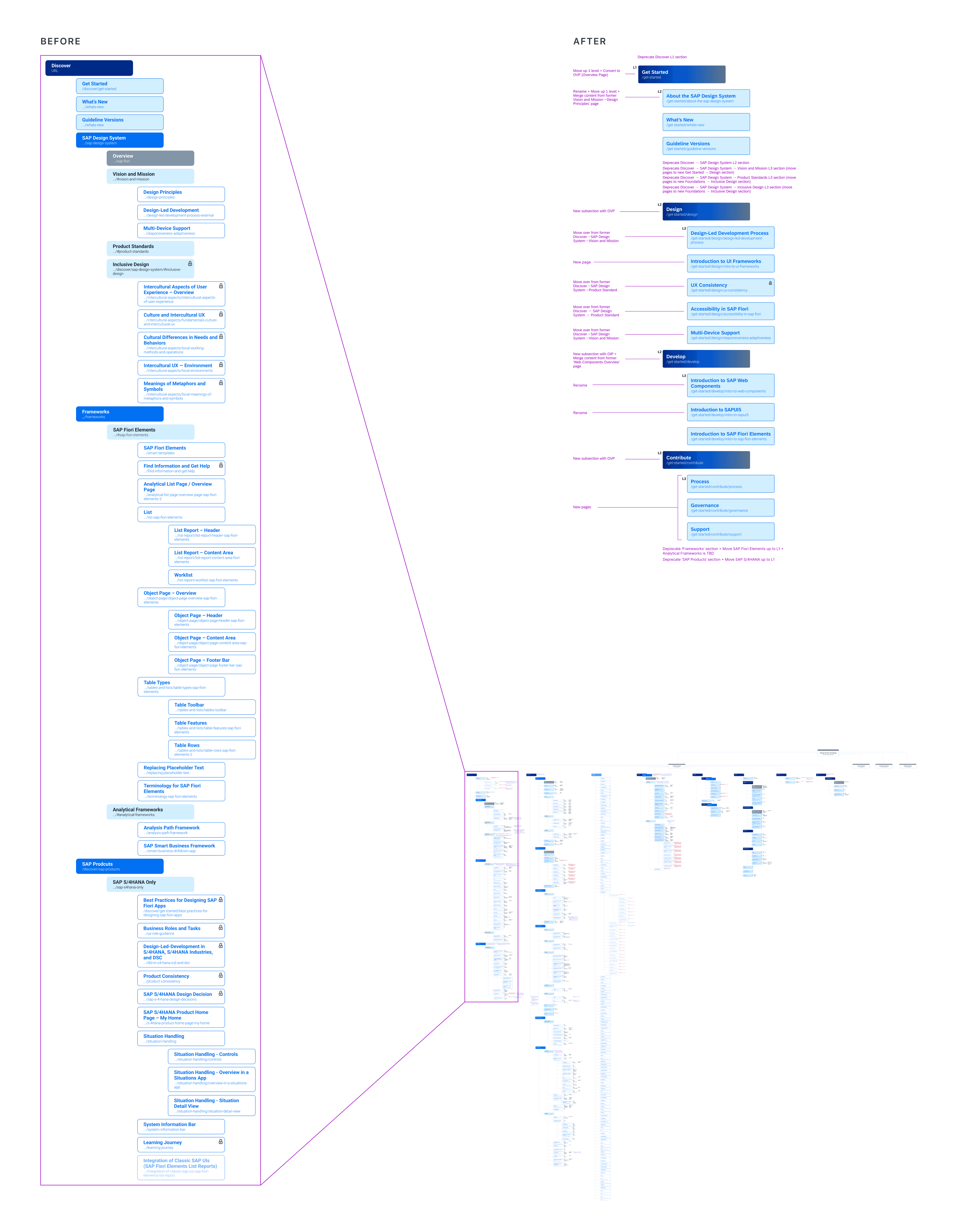
Several subsections were deprecated and redistributed to related topic areas to streamline the 'Get Started' section. The remaining subsections in this section are now organized around user journeys, provide clear entry points for each target audience.
*Improvements are being made across the entire information architecture; only a select section is shown here.
Several subsections were deprecated and redistributed to related topic areas to streamline the 'Get Started' section. The remaining subsections in this section are now organized around user journeys, provide clear entry points for each target audience.
*Improvements are being made across the entire information architecture; only a select section is shown here.
Several subsections were deprecated and redistributed to related topic areas to streamline the 'Get Started' section. The remaining subsections in this section are now organized around user journeys, provide clear entry points for each target audience.
*Improvements are being made across the entire information architecture; only a select section is shown here.
Impact
Impact
Impact
We established data-driven design process where design directions are informed by user feedback and design decisions are also validated by user testing. By doing so, we’ve been able to prioritize the most high-impact initiatives and make informed decisions grounded in user needs. This approach has also strengthened our collaboration with cross-functional partners by providing a shared foundation for alignment and decision-making.
We established data-driven design process where design directions are informed by user feedback and design decisions are also validated by user testing. By doing so, we’ve been able to prioritize the most high-impact initiatives and make informed decisions grounded in user needs. This approach has also strengthened our collaboration with cross-functional partners by providing a shared foundation for alignment and decision-making.
We established data-driven design process where design directions are informed by user feedback and design decisions are also validated by user testing. By doing so, we’ve been able to prioritize the most high-impact initiatives and make informed decisions grounded in user needs. This approach has also strengthened our collaboration with cross-functional partners by providing a shared foundation for alignment and decision-making.
Want to see more?
Want to see more?
Want to see more?
I have a full case study for this project—please click below for the presentation deck.
I have a full case study for this project—please click below for the presentation deck.
I have a full case study for this project—please click below for the presentation deck.